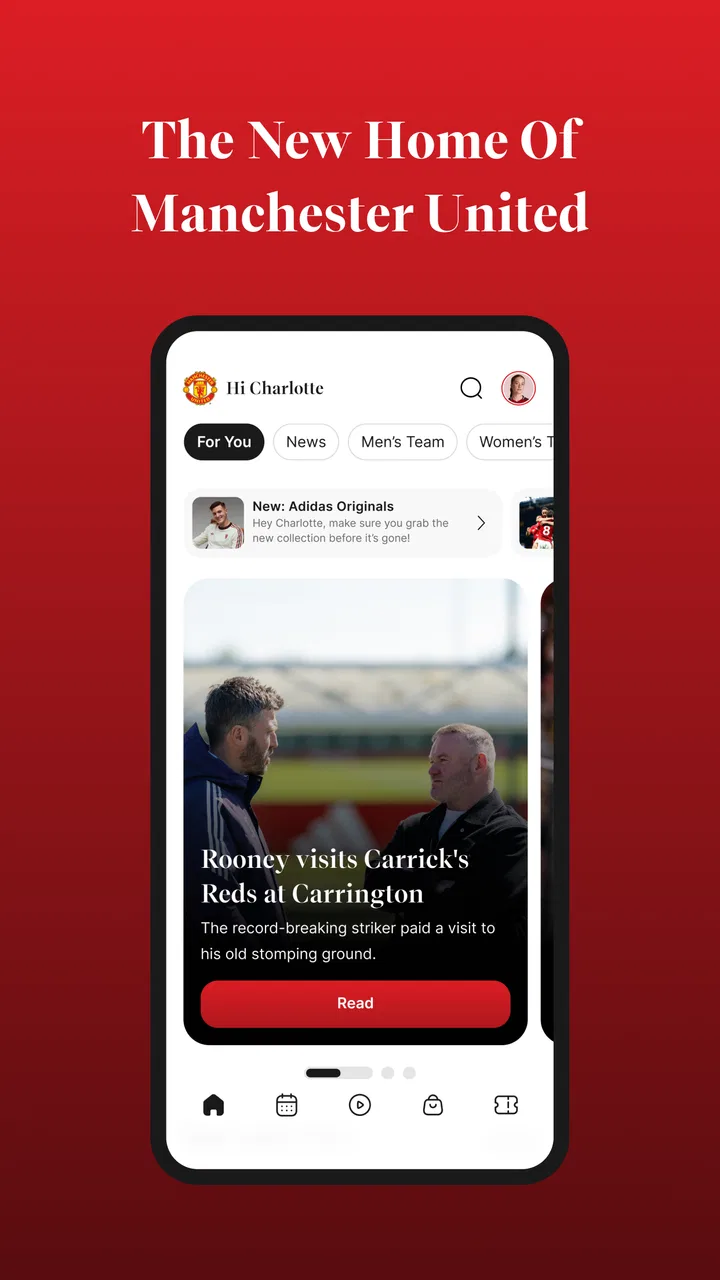
Manchester United Official App
- 4.5
- Rating
- 10.00M
- Installs
- Free
- Price

 Analysis by App-foxy
I installed the Manchester United Official App expecting a straightforward club news feed, but it feels more useful when treated as a daily companion for following the team. It brings match coverage, club updates, ticket information, shop access and other United-focused services into one place. That concentration is its biggest strength: I do not need to jump between a general sports app, a browser and several club pages whenever I want to catch up.
It is a free sports app from Manchester United Limited, available for everyone and supported on Android devices running version 7.0 or later. The current version is 27.0.1, and the app has passed the ten-million-install mark. Those details matter less than the practical question of whether it fits your habits, but they do show that this is not a small fan project or a temporary companion. It is the club’s main mobile doorway for supporters.
My overall impression is positive, with one important qualification: this is best for people who want an official United-centered experience, not for someone who needs the broadest possible football coverage. If I am following several clubs, comparing live scores across a league or looking for deep statistical analysis, a dedicated sports platform is usually more efficient. If I want United news, match-day material and club services together, this app makes much more sense.
You May Also Like

 Pandora - Music & Podcasts
Pandora’s Music Is Easy to Start, but Harder to Recover
Pandora’s strength is its low-effort path from a seed to a station. Its weak spot is how much confidence it asks you to place in connection, setup, and quiet recovery.

 8 Ball Pool
 Is Built on Rivalries, Rematches, and Routine
A close look at the rivalries, rematches, shared routines, and unanswered safety questions that turn a quick pool match into a persistent mobile community.

 Samsung Music
’s Quiet Strength Is Playing What You Already Own
Its reach comes less from spectacle than from dependable access to a personal library. That simplicity is both the app’s strongest retention engine and its ceiling.

 AccuWeather: Weather Radar
AccuWeather Review: A Quick, Clear Forecast for Everyday Decisions
For everyday plans, the best forecast is the one you can understand quickly. AccuWeather makes rain timing, radar, and local conditions easy to act on, with a few trade-offs.

 Hill Climb Racing
Why Hill Climb Racing Still Turns Crashes Into One More Run
A tiny car, a bumpy hill and one more upgrade: Hill Climb Racing keeps resurfacing because its simple chaos makes every near-miss feel personal.

 AliExpress - Shopping App
AliExpress Makes Global Shopping Feel Personal, but Shoppers Bear the Risk
AliExpress turns a global marketplace into a pocket-sized discovery engine. Its reach is useful, its shopping loop compelling, and its trade-offs easy to miss.
More From Our News Desk
View All News


How the current app fits into a supporter’s routine
I find this app most useful when a supporter’s routine includes quick check-ins as well as occasional practical tasks, such as looking up ticket information or browsing the club shop. That mix can work on a shared household device, but it helps to decide who is using it and for what before moving into account or purchase screens. From there, the key question is how each person can keep their own activity and decisions clear.
A practical home base for United news
The first thing I noticed is how naturally the app works as a quick check-in tool. I can open it during a commute, before work or while making coffee and get back into the United conversation without searching through unrelated headlines. That sounds simple, but it changes the experience compared with using a general news application, where club stories are mixed with transfer speculation, rival coverage and unrelated sports.
The official focus is also useful when accuracy and context matter to me. A club app is not trying to cover every team equally; its purpose is to keep supporters close to Manchester United. That makes it a good choice for checking club announcements and following the team’s own presentation of events. I still prefer independent reporting when I want criticism, wider context or competing viewpoints, so I would not use this as my only football source.
The app’s store summary points to live Tour matches as well as news, shop access and tickets. In practice, that combination makes it broader than a simple news reader. It is closer to a digital supporter hub, where editorial content sits alongside practical club services. I found that especially convenient when I wanted to move from reading about the team to looking at merchandise or checking match-related information without opening a separate browser tab.
Match days are where the idea makes the most sense
On a match day, the value of having everything United-related in one app becomes clearer. I can use it for a quick pre-match visit, return for updates around the game and then browse the club’s follow-up material afterward. The exact usefulness depends on what kind of coverage I want, but the workflow is less scattered than relying on social media posts from different accounts.
There is also a psychological advantage to an official club app. Social platforms are fast, but they are noisy. A supporter can easily lose an important update among posts, arguments and recycled rumours. The United app gives me a more controlled place to begin. I can then move elsewhere for discussion or analysis when I want it, rather than letting the most dramatic post decide what I see first.
One tip I would give new users is to treat the app as a starting point rather than a replacement for every other football tool. Use it for the club’s own news, service information and official match-related material. Keep a broader sports app for league-wide scores and comparisons. That division of labour avoids the main weakness of a club-specific product: its narrow scope is a strength for loyalty, but a limitation for wider football tracking.
Useful beyond football headlines
The inclusion of shop and ticket functions gives the app a different role from ordinary sports readers. A supporter planning a visit, considering club merchandise or simply wanting one official place for United services may appreciate that these areas are connected to the same identity. I like that the app acknowledges fans as more than readers; some want news, some want match access, and others want to buy something connected to the club.
That convenience should not be confused with a guarantee that every transaction will feel effortless. Shopping and ticketing are higher-stakes tasks than reading an article. I would take extra care with account details, seat information and final purchase screens, especially when moving quickly on a busy match day. The app can bring the service closer, but I still approach a ticket purchase more carefully than a casual news visit.
The free download lowers the barrier to trying it. The app is listed with a 4.5 average from around 493 thousand ratings, which suggests a generally strong response from a substantial audience. There are optional in-app purchases ranging from $0.99 to $89.99 per item, so I would pay attention to the checkout flow and distinguish ordinary browsing from anything that leads to a paid add-on or purchase.
What the version number tells existing users
Version 27.0.1 indicates that the app has continued to evolve rather than remaining a one-time digital brochure. The release history is relevant to existing users because a mature club app usually has to balance several audiences at once: people checking a score, supporters reading interviews, visitors dealing with tickets and customers browsing the shop. Keeping those paths together requires ongoing maintenance.
I would not treat the version number alone as proof that every part of the experience has changed dramatically. A current release can include refinements that are easy to miss, and the most meaningful improvements may be felt as smoother navigation or better reliability rather than a completely redesigned screen. That is why I judge this app by how quickly I can reach the task I came for, not by whether every update looks visually different.
For someone already using an older release, the sensible approach is to update before an important match or ticket-related task rather than waiting until the last minute. A current build gives the best chance of seeing the latest supported experience, while installing an update immediately before an event can be inconvenient if the connection is poor. I prefer to keep it updated during ordinary use and then check the key section I need before relying on it.
Small workflows that make it more useful
My most useful workflow is to separate quick checks from deeper browsing. When I only have a minute, I look for the newest United item and leave. When I have more time, I move through the broader club areas and decide whether I want news, match material, shop information or ticket-related content. This prevents the app from becoming an endless scroll and makes its multi-purpose design feel more manageable.
A second useful habit is to open the app before a planned club activity rather than during it. If I am considering a ticket or merchandise purchase, I browse in advance, note what I actually need and avoid making a rushed decision while distracted. The official hub is convenient, but convenience can encourage impulse actions, particularly when paid items are available inside the same app.
A third tip is to use the app for official confirmation when social media is moving too quickly. Rumours can spread long before a supporter has time to check their source. I would not assume that every important story must appear instantly, but the official app is a sensible place to verify whether the club has published something directly. That is a more disciplined habit than treating every post in a fan discussion as equally reliable.
Where the experience can feel limited
The main limitation is focus. Manchester United supporters may enjoy that nearly every path leads back to the club, but neutral football followers will find the experience too narrow. If I want a single screen showing fixtures, scores and news for many teams, this app is not the right tool. A general sports application will usually be faster for that job because it is designed around comparison rather than club identity.
The same issue applies to analysis. The app is well suited to staying close to United’s official output, but I would not expect it to replace specialist statistical services, long-form tactical websites or independent journalists. Those alternatives are better when I want historical comparisons, detailed player metrics or a debate that includes uncomfortable criticism. The official app and those services serve different purposes, and using both is more realistic than demanding everything from one.
There is also a possible navigation trade-off in combining editorial content, commerce and access services. A fan who only wants news may feel that the shop and ticket areas are distractions, while someone planning a stadium visit may appreciate the same structure. In my experience, the app works best when I remember why I opened it and avoid treating every section as equally relevant on every visit.
Because the app is rated for Everyone, it is approachable for a broad family audience. That does not mean every feature will be equally interesting to every age group. A younger supporter may mainly want match content, while an adult may care more about tickets or shopping. The broad age rating is helpful for accessibility, but the app’s real suitability still depends on what each person expects from a club companion.
Who should install it, and who should skip it
I would recommend it to a committed United supporter who wants an official source close at hand. It is also a good fit for someone who regularly checks club news and occasionally needs ticket or shop information. The free entry point makes it easy to test without committing to a subscription, and the combination of services gives it more practical value than a simple branded news feed.
I would be less enthusiastic if your interest is mainly in the wider sport. A supporter who follows multiple clubs will probably spend more time in a general football app and may only need the United app for official club material. Likewise, if you dislike commerce being placed near editorial content, the combined design may feel busier than a clean news reader.
I would also skip it as a primary tool if detailed live statistics are your priority. The app’s identity is built around Manchester United, not around being a neutral data dashboard. For tactical research, fantasy football, league tables or cross-competition comparisons, another service will likely be more efficient. Installing it as a companion can still make sense, but I would not choose it as the only football app on my phone.
Cost, access and everyday practicality
The app itself is free, which is important for casual supporters who only want to look around. The presence of in-app purchases means “free” should be understood as free to install and use at its basic level, not as a promise that every possible action costs nothing. I found the distinction straightforward in principle, but I would still read each payment screen carefully, particularly when browsing with children or when a ticket or shop decision is involved.
Android users with version 7.0 or newer can use it, so compatibility covers a wide range of devices. I would still keep enough storage and a dependable connection available before a major match-related task, simply because a multi-purpose app is more demanding in practice than a static webpage. That is general preparation rather than a special claim about this particular release, but it makes the experience less stressful.
For a realistic everyday scenario, imagine a supporter who has ten minutes before leaving home. They open the app to catch up on United news, check the club’s current match-related material, and then look at a ticket or shop section they had already planned to visit. The app saves them from searching through several official pages. Later, they can use a broader sports app for other results and return here when they want the United-specific view.
What I would watch as the app continues to develop
The most important thing to watch is whether future updates keep the different parts of the experience easy to reach. The current version, 27.0.1, shows an actively maintained product, but continued evolution should be judged by practical clarity: can a supporter find news quickly, can a visitor reach ticket information without confusion, and can a shopper understand what they are paying for?
I would also pay attention to how well the app balances official presentation with usefulness. Club-controlled content is valuable for announcements and direct communication, yet supporters also need context and independent perspectives. The best role for this app is not to imitate a newspaper or replace a football data service. It is to remain the dependable official layer in a wider personal setup.
Finally, I would watch whether the app continues to justify its place on the phone for people who do not buy tickets or merchandise. News and match coverage need to remain strong enough that a casual supporter can return regularly without feeling pushed toward other sections. If that balance holds, the app can serve both the highly involved fan and the person who only wants a reliable United check-in.
My final take
After using it, I see the Manchester United Official App as a focused club companion rather than a complete football universe. Its strongest quality is the way it brings official United news, live Tour match coverage, ticket-related access and shop functions into one recognizable place. That makes it particularly convenient for supporters whose digital life already revolves around the club.
Its limitations are just as clear. The experience is not designed for broad league coverage, neutral comparison or deep independent analysis, and the mixture of content and commercial services may feel more involved than a basic news app. I would pair it with a general sports service rather than force it to handle every football task.
My recommendation is simple: install it if you want Manchester United’s official world close at hand, but use it alongside—not instead of—the wider football tools you already trust. With a 4.5 average from a large supporter community, a free starting point and a current 27.0.1 release, it is an easy app to try. Just approach paid areas carefully, keep your expectations specific and use its club focus as an advantage rather than expecting it to be something it was never meant to be.
FAQs for Manchester United Official App
01What can I do with the Manchester United Official App?
The Manchester United Official App is designed for supporters who want club news, match information, team updates, videos, interviews, fixtures, results, league tables, and official announcements in one place. It can also provide access to live match coverage, notifications, ticketing information, merchandise links, and other club services, although the exact content may vary depending on your location and the current football season.
02Does the Manchester United Official App provide live match streaming?
The app may offer live match commentary, minute-by-minute updates, team news, statistics, and selected audio or video content, but it should not automatically be considered a free live-streaming service. Broadcasting rights differ by country, competition, and subscription package. Before downloading, check which live features are available in your region and whether certain matches require a separate paid service or television subscription.
03Is the Manchester United Official App free to download and use?
The Manchester United Official App is generally free to download, and many basic features, including news, fixtures, results, and notifications, can usually be accessed without payment. However, some content or services may involve additional costs, such as premium video, match access, membership benefits, tickets, hospitality, or purchases made through linked club stores and official platforms.
04Can I use the app to buy Manchester United tickets or merchandise?
The app can help supporters find official information about tickets, memberships, hospitality, and Manchester United merchandise. Depending on the feature and your location, it may complete the transaction inside the app or redirect you to an official club website. Ticket availability is often limited, and purchasing may require a registered account, membership, identity verification, or compliance with specific sales rules.
05Does the Manchester United Official App send notifications and collect personal data?
Yes, the app may request permission to send push notifications about match kickoffs, goals, lineups, breaking news, results, transfers, and club announcements. You can normally control these alerts through the app or your device settings. Like most official sports apps, it may collect account, device, usage, and preference information, so reviewing its privacy policy before registration is recommended.
Pros
- Official source for club news
- fixtures
- results
- and announcements.
- Match Centre provides live updates
- lineups
- and key match information.
- Includes video content
- interviews
- highlights
- and behind-the-scenes features.
- Useful squad section with player profiles and team information.
- Ticketing
- merchandise
- and membership links are conveniently accessible.
Cons
- Some premium content may require a membership or separate subscription.
- Notifications can become frequent
- especially on matchdays and transfer news.
- Video playback may depend heavily on connection speed and region.
- The app focuses almost entirely on Manchester United-related content.
- Ticket and store features may redirect users to external web pages.

Manchester United Official App
Gallery